RSS feeds are something you need to get into as a niche marketer if you are serious about getting traffic to your blog.
It really is amazing how easy it is.
If you use any of the standard blogging platforms like blogger or Wordpress, you already have an inbuilt RSS feed generator. So why are you not leveraging it?
I have been an enthusiast of RSS feeds for a while now and have written a few posts on RSS feeds on this blog.
And I have always used RSS Feeds in conjunction with other traffic generating methods. After all it's about multiple sources of traffic
Anyway I put RSS to the test on a brand new blog I set up a few weeks ago
First, I focused on getting content to the blog, so no advertising, no monetization, no link building, just content with some on page optimization.
It's a wordpress blog so I suppose it already has some potential to get traffic. And I was getting about 7 to 10 visits a day which is pants but not bad for a site with no incoming links. Having said that a lot of the traffic was people trying to post spammy comments :(
Once I had 10 good quality posts up I decided it was time to test out the RSS feed theory. So i submitted my feed to a bunch of feed directories and then went on to other things.
What happened to my blog traffic? Getting 100 to 200 visits a day
I wouldn't believe it if I didn't test it out myself.
I think the RSS feeds work because some of the feed directories have do follow links and help your search engine position.
Also people use your feeds to generate content for their sites. Especially now that autoblogging is on the rise
The question arises. How often should you submit your RSS feeds to the directories. I submitted only once to each directory and I think that one RSS feed submission per directory is enough.
But even submitting once to all the feed directories can be a big drain on your time, especially if like me you have a bunch of websites
To get round this I use this RSS submitter. It's reliable and really easy to use
So something to consider guys. Submit you RSS feeds to the feeds directories for traffic
Till next time
Showing posts with label RSS Feeds. Show all posts
Showing posts with label RSS Feeds. Show all posts
Friday, 19 March 2010

Friday, 1 May 2009
How To Create An RSS Feed
If you have a website that does not have an RSS feed, here is a quick guide on creating a basic RSS feed for your site
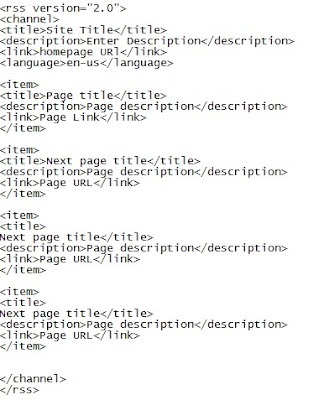
Open your HTML editor and create a new page
Go to the HTML code version and enter the following code with the appropriate details of your site inserted
The code is
When you save the as an xml file
Call it feed
Upload to your hosting account in the root directory of your website
Validate the feed at http://feedvalidator.org/
The URL of your feed is yourdomainname/feed.xml
Once validated, you can distribute your newly created RSS Feed URL to the feed directories.
Thursday, 9 April 2009
How To Add Your Blog Feed To Your Facebook Profile
Here is a step by step guide on how to add your blog feed to your Facebook profile
- Log in to your Facebook account
- Hover your mouse over the settings tab near the top right side of the page
- A drop down menu will appear
- Click on the application settings tab in the drop down menu
- This will bring up the applications setting page
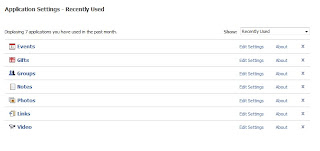
- Click on the 'Notes' tab
- This brings up the Notes page. On the right side of the page you will see a clickable link that says 'import a blog'.
- It looks like this
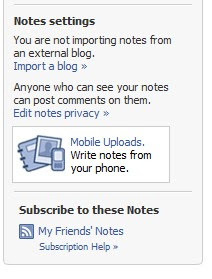
- Click on the import a blog link
- This loads the following page
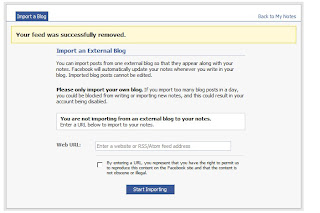
- Enter the blog feed where it says 'enter URL'
- Click the radio button to accept the Facebook terms
- Next click on 'Start import'.
- Once imported you will be prompted to review the content and then confirm at the bottom of the page
It really as easy as that to add your blog feed to your Facebook profile
Wednesday, 11 March 2009
Odiogo Problems Solved
So a few days ago I decided to podcast the posts on this blog. And as I said in the post on how to convert your blog posts into podcasts, there were several free options open to me.
I decided to go with Odiogo simply because I liked the range of options and the feel of the service
Problem was the podcasts were rather short.
The point of adding audio was to get the ENTIRE blog post into audio format!!
So I contacted Odiogo and the long and short of it is THE PROBLEM IS SORTED
A heads up if you use blogger as your platform. Before you set up Odiogo, you must make sure that your feeds setting in you blog is on full feeds and not short.
To edit the URL feed,
I decided to go with Odiogo simply because I liked the range of options and the feel of the service
Problem was the podcasts were rather short.
The point of adding audio was to get the ENTIRE blog post into audio format!!
So I contacted Odiogo and the long and short of it is THE PROBLEM IS SORTED
A heads up if you use blogger as your platform. Before you set up Odiogo, you must make sure that your feeds setting in you blog is on full feeds and not short.
To edit the URL feed,
- Log in to your blogger account
- Select the blog you want to put audio on
- Click on settings
- A new page will open up
- Navigate to the "site feed" tab and click on it
- The feeds setting page will load
- Change the setting under the allow blog feeds tab from short to full and click save
To add audio to your site
- Go to Odiogo.com
- Submit your blog's feed URL to Odiogo
- An Audio of all your blog posts will be created
- You will also be given the option of adding the Odiogo gadget to your blog
- Copy the code
- Go into your blogger account
- On the layout page, add the html code you copied as a gadget
- Save
- An email will be sent to you confirming your feeds have been generated and giving you the link to your control page
That's it.
If you have already added Odiogo to your blogger blog before editing the feeds setting from short to full, No worries.
The Odiogo feed is updated a few times a day so the full version of your podcast will be available to your blog visitors before the day is done
Till next time
Thursday, 29 January 2009
RSS Feeds, Quick comment
Just a quick comment on one of the responses I got on the last two posts. A fellow blogger and a friend went the extra mile and put a button for millionrss on his blog. The idea is peopel who visit his blog will bookmark his feed and therefore increase his feeds prominence at the RSS feeds directory. Kinda like social bookmarking.
I think this is great, but as a marketer you need to be selective about which social bookmarking sites you want to achieve prominence in. Then spend time building relationships at those sites.
It really does take time to build enough followers or friends to significantly impact your links..
So what am I saying?
Great idea Andrew, as long as you limit the number of bookmarking sites you want to work with or perhaps outsource things
I think this is great, but as a marketer you need to be selective about which social bookmarking sites you want to achieve prominence in. Then spend time building relationships at those sites.
It really does take time to build enough followers or friends to significantly impact your links..
So what am I saying?
Great idea Andrew, as long as you limit the number of bookmarking sites you want to work with or perhaps outsource things
Monday, 26 January 2009
Some RSS Diectories Bloggers Must Consider
As a follow on to the previous post on RSS directories and niche blogs, here is a list of four feed directories that I suggest you submit your blog's RSS feeds to. Obviously as you gain more experience with using feeds, you will also discover other feeds directories that you think have good results.
RSS Feeds
RSS Mountain
One of the largest feed directories. Has over a million feeds. Submission is free but requires an email address
Feedbees
A relatively new RSS directory that launched early last year and now has over 200000 feeds. Feed submission is free and they use Adsense for RSS. This means any clicks on adsense ads in your feed generates revenue for you.
Millionrss
Almost 200000 feeds A free feed directory that is easy to use. needs an email address and some details
Feedfury
Only has about 35,000 feeds but seems to have a wide reach especially in the US

Myblog2U is a newer directory. It requires a reciprocal link for your link to be accepted but this may be an advantage as it helps weed out a lot of the dross
So what next?
Get the RSS feed of your blog and get submitting
Till next time
RSS Feeds
RSS Mountain
One of the largest feed directories. Has over a million feeds. Submission is free but requires an email address
Feedbees
A relatively new RSS directory that launched early last year and now has over 200000 feeds. Feed submission is free and they use Adsense for RSS. This means any clicks on adsense ads in your feed generates revenue for you.
Millionrss
Almost 200000 feeds A free feed directory that is easy to use. needs an email address and some details
Feedfury
Only has about 35,000 feeds but seems to have a wide reach especially in the US
Myblog2U is a newer directory. It requires a reciprocal link for your link to be accepted but this may be an advantage as it helps weed out a lot of the dross
So what next?
Get the RSS feed of your blog and get submitting
Till next time
Saturday, 24 January 2009
RSS feed Directories And Niche Blogs
So if you are using the blogger platform for your blogs you will notice an icon at the bottom of your page that says 'posts atom'. This is the URL of the RSS feed for your site. An RSS feed is simply a very simple format of your site that can be displayed on other peoples site. It is a website snippet so if someone posts the url of your RSS feed on their website then it displays some of your content on the site
Is this a good thing. You Betcha!
RSS feeds are a great way to get visitors to your site. Often the feed displays only a snippet of your content i.e the first few words or paragraph of a post.
Lets paint you a picture. Adam goes to site x a feed aggregation site that just manages to rank high in the search engines. On that site he sees an interesting first paragraph of a post on your blog. He sees this because site x has subscribed to your RSS feed. He finds this opening paragraph intriguing and clicks the read more tab. This takes him to your blog, which if well written will hold for him a lot of interesting and useful content that brings him back again and again
It would be an easy world if all you had to do was post useful content to your blog and the big sites scurry to your site and excitedly subscribe to your feeds.
The sad truth is in a world with millions of blogs and a lot of these with good content, you actually will need to be a little proactive about getting your feeds out there.
I am talking about feed directories. You need to submit your feeds to as many RSS directories as possible. It is slow and tedious but it really is well worth it.
In the next post, I will give you a list of feed directories that you can get started with
Is this a good thing. You Betcha!
RSS feeds are a great way to get visitors to your site. Often the feed displays only a snippet of your content i.e the first few words or paragraph of a post.
Lets paint you a picture. Adam goes to site x a feed aggregation site that just manages to rank high in the search engines. On that site he sees an interesting first paragraph of a post on your blog. He sees this because site x has subscribed to your RSS feed. He finds this opening paragraph intriguing and clicks the read more tab. This takes him to your blog, which if well written will hold for him a lot of interesting and useful content that brings him back again and again
It would be an easy world if all you had to do was post useful content to your blog and the big sites scurry to your site and excitedly subscribe to your feeds.
The sad truth is in a world with millions of blogs and a lot of these with good content, you actually will need to be a little proactive about getting your feeds out there.
I am talking about feed directories. You need to submit your feeds to as many RSS directories as possible. It is slow and tedious but it really is well worth it.
In the next post, I will give you a list of feed directories that you can get started with
.gif "Free Traffic System - Increase Targeted Website Traffic with Free
Unlimited One Way Links")