

Everyone is banging on about the quality of blog posts.
And I'll confess, I have done my fair bit of this also.
There really is no doubt that the quality of your website content, be it blog post or website content is crucial.
That really goes without saying.
But there is quantity as well and a lot of people are leaving this one out
Quantity matters
Quantity matters to your search engine optimization
Quantity matters to retaining return visitors
Quantity matters to the reach of your website
Quantity matters to the amount of revenue you can make from your site
I'll give you an example.
If you think about it, the blogs that tend to do extremely well in the search engines post several times a day. Some of the posts are rather dull. But hey! it's useful content to someone.
Again think about this.
How often do you go back to a blog that hasn't had a new blog post in a couple of weeks? For me the answer is 'Not very often!'
Life is too short and a lot of us are impatient to get our next tip or bit of news.
So we tend to gravitate towards sites or blogs that have something new every time we visit
And another thought.
More posts = More keywords
The more posts or content you have, the more keywords and keyword phrases you can compete for in the search engines.
Lets take the extreme example of wikipedia. There is a wiki page for virtually every search term worth ranking for.
I am not saying make your blog or website the new wikipedia.
But I am saying with frequently updated content and frequent posting, you can cover a lot of search terms related to your niche
Now do not misunderstand the thrust of this post.
Quality does matter and the aim should be to write posts that have genuine, valuable information.
But quantity is something that can help get a lot of momentum for your website or blog pretty quickly
Sunday, 27 September 2009

Monday, 21 September 2009
My Big Adsense Awakening
Adsense and making a significant income online are a pipe dream. At least that's what I thought when I first started on this internet marketing or niche marketing business path
Like a lot of my niche marketing colleagues, it was a good adsense day when I made $2 in that day
'WOW'
Not really the fast track to financial freedom :(
And like a lot of people out there still seem to believe, if what we read in the forums is anywhere near the truth, I thought the people who make a significant income with adsense must belong to some secret club where they share the real secrets about making money with adsense
And you may snigger but the concept of adsense secrets has been used as a marketing gimmick [successful] by many a marketer
I knew I didn't have a chance of getting into any inner circle of adsense insiders, if they did exist
So I focussed on what I know and urge you if you are reading this to do the same
I focussed on content and traffic. I really knuckled down and worked hard on my sites.
Be it search engine optimization, social networking, forum participation... I was there.
I worked hard.... very hard
And you know I slowly noticed an increase in my adsense revenue.
At first it was sporadic good days, and then things evolved into sporadic bad days. I hope you can tell the difference
And so I had my huge adsense awakening. The information you need to make a success of this is all there. The tools you need to make adsense work for you, most of you probably already have
All you need to do is focus on your content, learn how to generate traffic for the long term. Work hard and adsense will pay you
Like a lot of my niche marketing colleagues, it was a good adsense day when I made $2 in that day
'WOW'
Not really the fast track to financial freedom :(
And like a lot of people out there still seem to believe, if what we read in the forums is anywhere near the truth, I thought the people who make a significant income with adsense must belong to some secret club where they share the real secrets about making money with adsense
And you may snigger but the concept of adsense secrets has been used as a marketing gimmick [successful] by many a marketer
I knew I didn't have a chance of getting into any inner circle of adsense insiders, if they did exist
So I focussed on what I know and urge you if you are reading this to do the same
I focussed on content and traffic. I really knuckled down and worked hard on my sites.
Be it search engine optimization, social networking, forum participation... I was there.
I worked hard.... very hard
And you know I slowly noticed an increase in my adsense revenue.
At first it was sporadic good days, and then things evolved into sporadic bad days. I hope you can tell the difference
And so I had my huge adsense awakening. The information you need to make a success of this is all there. The tools you need to make adsense work for you, most of you probably already have
All you need to do is focus on your content, learn how to generate traffic for the long term. Work hard and adsense will pay you
Saturday, 19 September 2009
What To Do With Long Blog Posts
So what does one do when the idea you are trying to get across just will not fit into 450 words.
There are a few options
Break it up
You can break up your posts into a series. You'll notice on this blog there are a few posts that are actually one topic broken into a few posts. If you do this you have two options in formatting a title for each post
Numerical. This is when all the posts in the series have the same title but are numbered i.e. part 1, part 2, etc. I have done this on niche traffic sale [this blog] and some of my other blogs. But there is a better way.
Unique titles. This method is excellent for optimizing for a bunch of long tail keywords. Each blog post in the series should have a title that is unique to it and competes for a different long tail keyword phrase from other posts in the series. Because you are going after long tail keyword phrases, there is less competition and the chances of each post doing well and therefore getting search engine traffic, is much higher
Page Layout
If you really must include all that content in one post then you should consider laying out the post so it is easy to read. You want you readers to be able to scan your article easily, get the major points you are trying to make, skip from one concept to another without working too hard
To achieve this, you could use white space, bullets and subheadings.
Subheadings are particularly important again because of the all important SEO. Subheadings have emphasis on them. They are areas where the search engine spiders expect your important themes to be. So include your keywords in your subheadings if this does not ruin the reading experience of your blog's visitors
There are a few options
Break it up
Numerical. This is when all the posts in the series have the same title but are numbered i.e. part 1, part 2, etc. I have done this on niche traffic sale [this blog] and some of my other blogs. But there is a better way.
Unique titles. This method is excellent for optimizing for a bunch of long tail keywords. Each blog post in the series should have a title that is unique to it and competes for a different long tail keyword phrase from other posts in the series. Because you are going after long tail keyword phrases, there is less competition and the chances of each post doing well and therefore getting search engine traffic, is much higher
Page Layout
To achieve this, you could use white space, bullets and subheadings.
Subheadings are particularly important again because of the all important SEO. Subheadings have emphasis on them. They are areas where the search engine spiders expect your important themes to be.
Friday, 18 September 2009
Ideal Length Of A Blog Post
So what is the ideal length of a blog post?
I see this question asked time and again in the forums.
The simple answer is ideally 250 to 450 words.
...Because...
Readership
Today's Internet user has so many options that he or she is impatient to get on to the next thing. The next website, or blog. Check email. Hang out on Facebook. Or is it twitter? So when they land on your blog and there is a lengthy post on some topic or the other, they move on.
Focus
There really is nothing more irritating than starting to read a blog post which is supposed to be about a certain topic and then find the post goes around the houses instead of just getting to the point. Or worse still, goes off topic completely.
Knowing that you have only 250 to 450 words in which to get your point across helps you focus your content. package your points in a clear succinct and effective form. This gets rid of all the rambling and makes each and every sentence valuable to your reader. Meaning... You get there attention
Search engine optimization
Now this one is debatable but a lot of SEO 'experts' advice 300 to 450 words is ideal for SEO. Certainly we know that low content is not ideal for SEO. It makes sense that with a few words on a page there will be issues like word count to code ratio. And also how often can you include your keywords in a 50 word post?
But sometimes you really cannot cover a topic in a blog post that is 450 words long. Especially if you want to write a pillar article that really exhaustively goes over all aspects of a topic.
So what do you do then?
We'll cover this in a future post. :)
I see this question asked time and again in the forums.
The simple answer is ideally 250 to 450 words.
...Because...
Readership
Focus
Knowing that you have only 250 to 450 words in which to get your point across helps you focus your content. package your points in a clear succinct and effective form. This gets rid of all the rambling and makes each and every sentence valuable to your reader. Meaning... You get there attention
Search engine optimization
But sometimes you really cannot cover a topic in a blog post that is 450 words long. Especially if you want to write a pillar article that really exhaustively goes over all aspects of a topic.
So what do you do then?
We'll cover this in a future post. :)
Saturday, 12 September 2009
How To Post Useful Blog Comments And Get Them Accepted
Posting comments on blogs can help generate traffic to your website or blog directly or indirectly if done properly.
By direct traffic I mean a reader of your comment clicks on your link and goes to your website or blog
By indirect traffic we are talking about the SEO benefit of the backlinks to your site or blog in your blog comment if the link is 'do follow'.
We all know this. It's blog commenting 101
But to have any effect, you need for the owner of the blog which you are commenting on to accept and publish your comment.
Gone are the days when comments were posted automatically.
Now there are antispam plug ins, e.g. askimet, and heavy comment moderation going on so you have to be savvy about this
So, to maximize your comments chances of being posted' keep the following in mind each time you post a blog comment
Relevance
Your comment must be relevant to the content of the post your are commenting on. It should directly address something in the post that the author has opened the door to.
Useful
Some bloggers like their egos massaged a little and those bloggers will allow a lot of 'great post on commenting' type comments. But these bloggers are few and far between.
The majority of us want comments that add to the content of our post. It could be an extra tip, a genuine question or even disagreement with the post content.
In allowing our visitors to make comments on our blogs, our main aim is to generate more content on our pages. Relevant useful content.
Links
Most comments boxes allow you to enter a user name, email address and URL.
The URL is automatically linked to the user name if the comment is accepted.
A lot of bloggers get irritated when in the body of the comment another link is dropped. Some will automatically reject your comment just on that bases.
I am not saying don't do it. But if you are thinking about dropping another link in your comment's content, look at the other comments already published on the blog to see if any contains additional links
User name
Because of the automatic association of username and URL, a lot of us like to use our keywords
as our user name.
Some blogs actually encourage this and usually have a little icon saying keyword luv.
However some blogs use plug ins to filter out 'scam' comments. And some of these plugins will reject any user names that contain certain keywords. So, again, look at the previous comments accepted in the blog to see if this may apply
Read the post
In our rush to get as many backlinks as possible, we sometimes do not read the blog post before commenting.
I recently put a post on this blog on generating sitemaps. The post went through everything from generating the sitemap to submitting it to Google's webmaster tools.
Someone tried to post a comment asking how they could generate a site map and submit it to Google. Oh and he or she had his URL included twice in his comment. Hey?
Needless to say that comment was rejected.
When posting, show evidence in your comment that you have actually taken the time to read the article you are commenting on
By direct traffic I mean a reader of your comment clicks on your link and goes to your website or blog
By indirect traffic we are talking about the SEO benefit of the backlinks to your site or blog in your blog comment if the link is 'do follow'.
We all know this. It's blog commenting 101
But to have any effect, you need for the owner of the blog which you are commenting on to accept and publish your comment.
Gone are the days when comments were posted automatically.
Now there are antispam plug ins, e.g. askimet, and heavy comment moderation going on so you have to be savvy about this
So, to maximize your comments chances of being posted' keep the following in mind each time you post a blog comment
Relevance
Your comment must be relevant to the content of the post your are commenting on. It should directly address something in the post that the author has opened the door to.
Useful
Some bloggers like their egos massaged a little and those bloggers will allow a lot of 'great post on commenting' type comments. But these bloggers are few and far between.
The majority of us want comments that add to the content of our post. It could be an extra tip, a genuine question or even disagreement with the post content.
In allowing our visitors to make comments on our blogs, our main aim is to generate more content on our pages. Relevant useful content.
Links
Most comments boxes allow you to enter a user name, email address and URL.
The URL is automatically linked to the user name if the comment is accepted.
A lot of bloggers get irritated when in the body of the comment another link is dropped. Some will automatically reject your comment just on that bases.
I am not saying don't do it. But if you are thinking about dropping another link in your comment's content, look at the other comments already published on the blog to see if any contains additional links
User name
Because of the automatic association of username and URL, a lot of us like to use our keywords
as our user name.
Some blogs actually encourage this and usually have a little icon saying keyword luv.
However some blogs use plug ins to filter out 'scam' comments. And some of these plugins will reject any user names that contain certain keywords. So, again, look at the previous comments accepted in the blog to see if this may apply
Read the post
In our rush to get as many backlinks as possible, we sometimes do not read the blog post before commenting.
I recently put a post on this blog on generating sitemaps. The post went through everything from generating the sitemap to submitting it to Google's webmaster tools.
Someone tried to post a comment asking how they could generate a site map and submit it to Google. Oh and he or she had his URL included twice in his comment. Hey?
Needless to say that comment was rejected.
When posting, show evidence in your comment that you have actually taken the time to read the article you are commenting on
Thursday, 3 September 2009
Digg Now Using No Follow Selectively
One of the major advantages of Digg was the do follow attribute on links there. You submit your story, you get a back link
Just read on the digg blog that digg has decided to put the no follow attribute on some of the links on the site
These include
Just read on the digg blog that digg has decided to put the no follow attribute on some of the links on the site
These include
- Links in comment
- Submit that do not meet a certain threshold in popularity
- Links in user profiles
Obviously the question now is, what are they using as a measure of popularity?
- Is it the number of diggs a story gets
- Or the number of times the link is clicked on
Still a little unclear but I'll let you know if there is any further news
Sunday, 30 August 2009
Digg. How to Get The Most Out Of Your Diggs

So now the shout system is gone, how can you get the most out of Digg for website exposure and traffic
In the past, when you submitted a story to Digg and wanted your friends to Digg to see it, all you needed to do was send a shout. Your friends got an email notification and..instant traffic. It really was as easy as that. And if they liked your story then they in turn Dugg it and, if it's really good sent a shout to their friends. And before you knew it you had a ton of traffic hitting your website or blog
Then one grey day, Digg decide to abolish the shout system. And I understand why....
....Spam. That ugly word. There were so many shouts on a daily basis and a lot of them were tagged with 'please Digg' or ' Digg this and I'll Digg yours' messages.
But then again there were shouts that I was interested in. Shouts that brought to my attention useful or quirky stories that I may not have otherwise come across.
Anyway, now the shouts system has gone, how can you get the most out of Digg. Here we are talking about maximizing exposure on Digg for your stories and getting some click throughs.
Friends
Twitter
Stories you submit to Digg
Source
Title and Description
Categories
Comments
Digg Button
So the shouts system may be gone but there is still a lot of potential in Digg
Saturday, 29 August 2009
How To Create A Sitemap For Google Indexing
You are going to learn an easy method of creating an XML sitemap for your website and how to submit it to Google for indexing
Sitemap Generator
First you need to generate the sitemap. A free sitemap generator I recommend is http://www.xml-sitemaps.com/
It's a free service and will generate a sitemap for any website with less than 500 pages in seconds

Type in the URL of the homepage of the website you want to generate a sitemap for. Submit and a few seconds later you will be presented with your results which should look similar to this
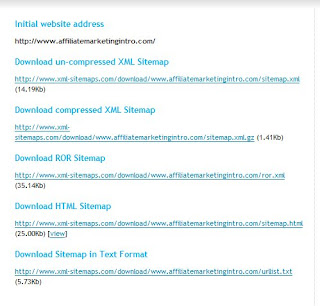
You will notice that there are quite a few downloadable files.
The files you want are the html file and the uncompressed xml file
HTML file
This file is one that your website visitors will be able to access once you upload it to your website. It is important that you exclude links to your private pages or pages that you do not want the general public to have access to or indexed. For example your download pages.
Download the file to your website folder on your desktop.
You can either upload the file as is to the root folder of your website as sitemap.html or you could first add the sitemap to your website template and then upload it using your FTP to your root folder as sitemap.html
XML file
Download the uncompressed xml file to your websites folder on your desktop. Save it as Sitemap.xml. For some reason the Google webmaster tools account emphasizes the capital S.
Upload the Sitemap.xml file to your website's root folder in your hosting account. Again before uploading make sure you have removed the links to the pages you do not want indexed in the search engines
Submit website to Google webmaster tools
Get yourself a google webmasters tools account at http://www.google.com/webmasters/tools/
The account is free and easy to sign up for.
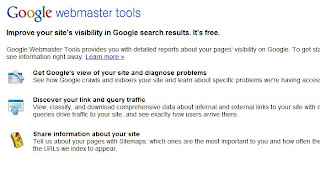
Submit and verify your website in your new webmaster tools account
Verification is pretty easy. They give you a code to add to your site. You can either add the code to an existing page or load a new page with the code on it. Obviously you will need to be the webmaster of your site or have quick access to your site's webmaster to do this.
Submit sitemap to Google webmaster tools
To submit your sitemap for indexing, log in to your webmaster tools account.
Go to the dashboard of the website you want to submit a sitemap for
On the left side of the page click on the site configuration link. This will bring up a sub menu. Click on sitemaps on that menu.
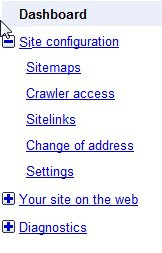
The page that loads will have a tab on it that says submit sitemap.
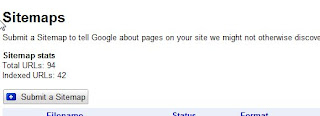
Click on this and submit the exact URL of your xml sitemap
Once submitted you will notice that the status is pending. This soon changes to a tick mark when you site map has been accepted
Sitemap Generator
It's a free service and will generate a sitemap for any website with less than 500 pages in seconds

Type in the URL of the homepage of the website you want to generate a sitemap for. Submit and a few seconds later you will be presented with your results which should look similar to this

You will notice that there are quite a few downloadable files.
The files you want are the html file and the uncompressed xml file
HTML file
Download the file to your website folder on your desktop.
You can either upload the file as is to the root folder of your website as sitemap.html or you could first add the sitemap to your website template and then upload it using your FTP to your root folder as sitemap.html
XML file
Upload the Sitemap.xml file to your website's root folder in your hosting account. Again before uploading make sure you have removed the links to the pages you do not want indexed in the search engines
Submit website to Google webmaster tools
The account is free and easy to sign up for.

Submit and verify your website in your new webmaster tools account
Submit sitemap to Google webmaster tools
Go to the dashboard of the website you want to submit a sitemap for
On the left side of the page click on the site configuration link. This will bring up a sub menu. Click on sitemaps on that menu.

The page that loads will have a tab on it that says submit sitemap.

Click on this and submit the exact URL of your xml sitemap
Once submitted you will notice that the status is pending. This soon changes to a tick mark when you site map has been accepted
Saturday, 22 August 2009
Number One Position In Google Search. Now What?
So you have added unique and useful posts to your blog or website frequently. And have worked tirelessly to get those backlinks to your blog.
And finally one day, you find your site at the coveted number one position for your chosen keyword or bunch of keywords in the search engines. Yippee
But what next?
The thing with search engine optimization is it is unfortunately a continual process. You have to continue working to maintain that number one position. Or your website may begin to slide in the search engine results pages. Especially if you are in a competitive niche.
So why does the decay occur? There are a few reasons for this
From time to time, Google changes the algorithm which it uses to assign relevance to websites. Because of this it is important to stay on top of what is going on in the SEO world so that you can adapt to these changes. A lot of webmasters wake up one day to find their listings have disappeared from position one or even page one of the relevant keyword results pages. Sometimes this occurs as a result of a penalty but often it simply is an algorithm change that favours other sites ahead of yours in the search engine positions race Some links that you have created to your site may become devalued over time. Or the webmaster of the site your links are on could do a revamp and either delete the page your link is on or convert his put going links to no follow. This means a reduction of the SEO boost from your links. You have to keep in mind that not all your competitors are naive about SEO. In fact with the credit crunch and the rapid expansion of online marketing and increasing competition, a lot of website owners are gaining some knowledge about and applying SEO. SO what does this mean? While you are busy counting the dollars earned as a result of your increased traffic from successful optimization, some of your competitors are busy building more and more links to their sites and getting fresh content.
The good news is once you have achieved your number one position in the SERPs, you really do not need to work as hard to maintain the position as you did to attain the number one spot.
I have some websites that have been number one in the weight loss niche and the internet marketing niche for competitive keywords for a while now. All I have done to maintain these positions is, from time to time, post a few articles to the article directories with backlinks to the sites. And of course add fresh content. But certainly not with the same desperate frequency as when I was trying to get the sites ranked.
So if you have a website or blog that you have managed to get to the number one position for a competitive keyword, and if the resulting traffic is making a significant amount of income for you, take the time or do some outsourcing to make sure that this position is maintained in the long term
And finally one day, you find your site at the coveted number one position for your chosen keyword or bunch of keywords in the search engines. Yippee
But what next?
The thing with search engine optimization is it is unfortunately a continual process. You have to continue working to maintain that number one position. Or your website may begin to slide in the search engine results pages. Especially if you are in a competitive niche.
So why does the decay occur? There are a few reasons for this
- Changing algorithms
- Links devalued
- Competition
The good news is once you have achieved your number one position in the SERPs, you really do not need to work as hard to maintain the position as you did to attain the number one spot.
I have some websites that have been number one in the weight loss niche and the internet marketing niche for competitive keywords for a while now. All I have done to maintain these positions is, from time to time, post a few articles to the article directories with backlinks to the sites. And of course add fresh content. But certainly not with the same desperate frequency as when I was trying to get the sites ranked.
So if you have a website or blog that you have managed to get to the number one position for a competitive keyword, and if the resulting traffic is making a significant amount of income for you, take the time or do some outsourcing to make sure that this position is maintained in the long term
Monday, 17 August 2009
How Many Backlinks Are Safe?
Backlinks are crucial to search engine optimization and majority of niche marketers are busy trying to get as many backlinks as possible.
But we know that the pattern with which our links increase is one of the factors that the search engines, mainly Google, monitor to determine sites that are artificially inflating their search engine position
So what does this all mean?
Does this mean that a sudden rise in the number of backlinks pointing to your site will automatically earn your site a penalty in the search engines? Or worse still get you banned?
Personally, I do not think so.
Let's think about things logically.
There have been a large number of very successful launches in the affiliate marketing niche. And when these programs first launch, a lot of us, affiliate marketers, get on the band wagon of promoting it avidly.
On our blogs, our websites, forum signatures and all what not.
Resulting in a sudden rise in the number of links pointing to the launch site.
But I honestly have never come across the scenario where these sites have been banned or penalized.
You may argue that some affiliate marketers use no follow in their affiliate links, but the majority do not.
What does this all mean?
To me, it implies that the search engines will note a sudden spike in links but before any action is taken, they try to see if there is any plausible explanation for the 'link flurry'
So the question remains.
How many backlinks are safe? Or to paraphrase the question, how man backlinks can
you generate to your web pages in a short period of time without getting banned?
The answer is the number really does not seem to matter
What matters is
But we know that the pattern with which our links increase is one of the factors that the search engines, mainly Google, monitor to determine sites that are artificially inflating their search engine position
The dates that links appear can also be used to detect
"spam," where owners of documents or their colleagues
create links to their own document for the purpose of
boosting the score assigned by a search engine. A
typical, "legitimate" document attracts back links
slowly.
So what does this all mean?
Does this mean that a sudden rise in the number of backlinks pointing to your site will automatically earn your site a penalty in the search engines? Or worse still get you banned?
Personally, I do not think so.
Let's think about things logically.
There have been a large number of very successful launches in the affiliate marketing niche. And when these programs first launch, a lot of us, affiliate marketers, get on the band wagon of promoting it avidly.
On our blogs, our websites, forum signatures and all what not.
Resulting in a sudden rise in the number of links pointing to the launch site.
But I honestly have never come across the scenario where these sites have been banned or penalized.
You may argue that some affiliate marketers use no follow in their affiliate links, but the majority do not.
A large spike in the quantity of back links may signal
a topical phenomenon (e.g., the CDC web site may
develop many links quickly after an outbreak, such as
SARS), or signal attempts to spam a search engine (to
obtain a higher ranking and, thus, better placement in
search results) by exchanging links, purchasing links,
or gaining links from documents without editorial
discretion on making links. Examples of documents that
give links without editorial discretion include guest
books, referrer logs, and "free for all" pages that let
anyone add a link to a document.
What does this all mean?
To me, it implies that the search engines will note a sudden spike in links but before any action is taken, they try to see if there is any plausible explanation for the 'link flurry'
So the question remains.
How many backlinks are safe? Or to paraphrase the question, how man backlinks can
you generate to your web pages in a short period of time without getting banned?
The answer is the number really does not seem to matter
What matters is
- The consistency with which backlinks to your web pages occur. This really means that if your site gets 100 new backlinks a day and it consistently gets about that number everyday then you should be okay as long as the links are varied in source and do not all come from sites the public can manipulate
- The type of sites that these links are coming from. As the document says, the type of link is also crucial. If all the links are from the comments portion of blogs, then I think it would be fair for Google to assume you are a spammer. But if the links come from a variety of places e.g. within the body of articles, forums, other webmasters sites [also within the body of
the content] then the likelihood of being perceived as artificial inflation of search engine rankings is less likely
What do you think?
Thursday, 13 August 2009
Traffic Exchanges Useful Or Not For Increased Website Traffic
Most affiliate marketers have heard of traffic exchanges. They are websites where you first submit your site's URL and then you have to view other peoples' sites to earn credits. The more credits you earn the more often your site will be shown to other people who are... surfing for credit
Any mildly intelligent person will have read the above statement and thought...hmmm
Let me clarify
Traffic exchanges are great for getting traffic to your site. The more you surf on these exchanges, the more traffic you'll get. There is no doubt about this
In my early days in affiliate marketing, I surfed till my eyes went blurred from staring at the computer so long and my fingers...ouch. All that clicking to load the next site
And I got a ton of traffic
And boy did I brag about my amazing 'talent' of generating traffic to my brand new site
And then the penny dropped
NO CONVERSIONS!!!
You see the big draw back of the many traffic exchanges out there is they are full of people, just like you, surfing just to earn credits and ONLY for the purpose of earning credits
So where is the market for your perfectly set up website?
The aim of affiliate marketing is to get your site visitors to click on your affiliate links and BUY THE PRODUCT
So all that time spent chasing traffic that will not convert. I often wonder how much faster I would have got where I am now if I had spent that time elsewhere.
Like generating content for my site
...or writing articles to distribute to article directories
...or even building a reputation for myself at the networking sites and forums
So like I said earlier in this post....Hmmm
Some die hard traffic exchange users may be thinking....But there is autosurfing
This is when the traffic exchange website automatically loads sites after a time delay.
Certainly that could save a lot of time. but there is the other issues of malware. Some people have reported getting infected by some of these sites. Personally, and thankfully, I did not fall victim to this while I was using traffic exchanges....I think
So Traffic exchanges are great for increasing website traffic. But it is traffic that converts that you need to focus on and for this purpose, there are more effective methods
Till next time
Any mildly intelligent person will have read the above statement and thought...hmmm
Let me clarify
Traffic exchanges are great for getting traffic to your site. The more you surf on these exchanges, the more traffic you'll get. There is no doubt about this
In my early days in affiliate marketing, I surfed till my eyes went blurred from staring at the computer so long and my fingers...ouch. All that clicking to load the next site
And I got a ton of traffic
And boy did I brag about my amazing 'talent' of generating traffic to my brand new site
And then the penny dropped
NO CONVERSIONS!!!
You see the big draw back of the many traffic exchanges out there is they are full of people, just like you, surfing just to earn credits and ONLY for the purpose of earning credits
So where is the market for your perfectly set up website?
The aim of affiliate marketing is to get your site visitors to click on your affiliate links and BUY THE PRODUCT
So all that time spent chasing traffic that will not convert. I often wonder how much faster I would have got where I am now if I had spent that time elsewhere.
Like generating content for my site
...or writing articles to distribute to article directories
...or even building a reputation for myself at the networking sites and forums
So like I said earlier in this post....Hmmm
Some die hard traffic exchange users may be thinking....But there is autosurfing
This is when the traffic exchange website automatically loads sites after a time delay.
Certainly that could save a lot of time. but there is the other issues of malware. Some people have reported getting infected by some of these sites. Personally, and thankfully, I did not fall victim to this while I was using traffic exchanges....I think
So Traffic exchanges are great for increasing website traffic. But it is traffic that converts that you need to focus on and for this purpose, there are more effective methods
Till next time
Sunday, 2 August 2009
Make Money With Adsense - Adsense Position
The position of your adsense units could significantly affect your click through rate.

I honestly thought this was Adsense 101, you know the basic basics of Adsense.
So why is it that when browsing the net you come across web pages with the Adsense at the end of the page?
Lets quickly run through how to determine the best position for Adsense on your website or blog
Lets quickly run through how to determine the best position for Adsense on your website or blog
For this I am assuming that Adsense is the main source of income from the web property you are optimizing.
General adsense position rules
- Adsense Block above the fold of the page
This one is really basic. You want to put the adsense units above the fold of the page to maximize the chances of any website visitor seeing your adsense ads.
Make it the first thing they see on your page.
If you have just content above the fold of the page, a visitor could quickly look at the content and decide to go to another site. No adsense click for you.
If you have adsense ads above the fold of the page, there is the possibility one of the ads titles could be what he is looking for. A click, kaching!!
- Adsense in page hot spot
Studies have shown that there are certain areas on a web page that attracts the eyes. these are areas that we instinctively look at. The hot spots of the page.
You want to include an adsense block in this area. Most of your web page's visitors will look at this spot meaning most of your web page visitors will see the adsense blocks displayed there, increasing the chances of them finding something of interest in the block. And clicking on it
- Adsense within body of content.
A really useful tip if used properly. We know that having an adsense block withing the top part of your content increases the click through rate, but this has to be done with some style.
You will see hundreds and thousands of web pages with the 300 by 250 block as the opening of the first paragraph. But the problem is they look like adsense ads camouflaged in content.
And no-one likes being tricked into clicking on an ad. You'll find that the regular Internet user has developed blindness to these ad blocks.
So I put adsense high in the body of my content, but I make the adsense blocks stand out. No tricks, no camouflaging. Just an adsense block breaking up the content
To Sum it all up, your adsense block needs to be displayed above the fold of the page, in the hot spot of your page and preferably with the body of your content
Before you run out and start pasting adsense all over your websites, a word of caution.
YOU ONLY NEED ONE OR AT THE MOST TWO ADSENSE BLOCKS PER PAGE TO MAKE THIS WORK
Hey?
You read this right. There are web pages out there with adsense pasted all over each page leaving the content, which is why the visitor came in the first place, difficult to decipher. Doesn't work.
I'll go into details of how many adsense units you should work with in another post
Before we finish, you must understand that each web page is unique. Above are GENERAL adsense position tips. But what will work on your web site or blog may be different.
You MUST TEST EVERYTHING.
Apply the tips above and see if there is an improvement in your click through rate for the next 100 visitors you get to your blog or website.
If there is no improvement , change the position and run things for another 100 visitors. For some pages it may be the link units that perform better so test those.
Till next time
Wednesday, 22 July 2009
Has Pingoat Shut Down
Pinging your blog is part and parcel of blogging these days. Every time you add a new post to your blog you should ping your blog's RSS feed to let feed aggregators know that you have updated your content
I have been a user of pingoat for a while now. It's reliable and easy to use
After adding a post to one of my blogs I went to pingoat to ... ping the post
Unfortunately the pinging service at pingoat is currently unavailable
Instead is one of those parked domain pages.
It's really sad to see pingoat go. I hope in the back of my mind that it is just temporary and they'll soon be back doing what they do best
It's interesting that the other service which I used from time to time kping also went down a while ago. But they have since come back but with a minor difference. There is now an opt in form to fill [name, email address and URL] before you can send your pings. Kping is still a free service, at least it was the last time I checked, but it is now a membership service
The problem with these services may be that they are so difficult to monetize. The Kping idea is an inspired one. The money is in the list after all
The good news is pingomatic seems to still be working...for now
UPDATE!!!
Pingoat is back online.
Yippee!!!
Update of UPDATE!!
Sorry guys.
Pingoat really is down
Not another pingoat update!!
It seems that Pingoat is still working but they are blocking the IPs of frequent users
Because I have so many blogs with reasonably frequent updates, it is understandable that I have intermittently had issues with accessing pingoat.
So to use Pingoat.com you will need a proxy. Unblocked.org is a reasonably user friendly proxy site
Also, there is another site called pingoat.net which looks identical to pingoat.com.
I have been a user of pingoat for a while now. It's reliable and easy to use
After adding a post to one of my blogs I went to pingoat to ... ping the post
Unfortunately the pinging service at pingoat is currently unavailable
Instead is one of those parked domain pages.
It's really sad to see pingoat go. I hope in the back of my mind that it is just temporary and they'll soon be back doing what they do best
It's interesting that the other service which I used from time to time kping also went down a while ago. But they have since come back but with a minor difference. There is now an opt in form to fill [name, email address and URL] before you can send your pings. Kping is still a free service, at least it was the last time I checked, but it is now a membership service
The problem with these services may be that they are so difficult to monetize. The Kping idea is an inspired one. The money is in the list after all
The good news is pingomatic seems to still be working...for now
UPDATE!!!
Update of UPDATE!!
Sorry guys.
Not another pingoat update!!
It seems that Pingoat is still working but they are blocking the IPs of frequent users
Because I have so many blogs with reasonably frequent updates, it is understandable that I have intermittently had issues with accessing pingoat.
So to use Pingoat.com you will need a proxy. Unblocked.org is a reasonably user friendly proxy site
Also, there is another site called pingoat.net which looks identical to pingoat.com.
Tuesday, 21 July 2009
Code Bloat Will Cripple Your SEO
For anyone building websites using WYSIWYGs [HTML editors] code bloat is a real risk to your search engine optimization efforts.
We know that for SEO purposes, the less our code is the better our sites perform, referred to as the code to content ratio. It's one reason why cascading style sheets are so successful.
Before I get ahead of myself, code bloat is the presence of HTML code that is redundant or unnecessary. It includes repetitive code for the same thing and dead code i.e. code that is not translated into anything meaningful on your web pages.
You may think if it's neither necessary nor interpreted, "why is code bloat a problem?"
First as I mentioned earlier, The code to content ratio. Especially if you have a lot of content on your pages. The more unnecessary code you have on your web pages, the more rot the search engines bots have to work through to get to your content.
Second these coding errors could result in the bots not being able to spider your page properly.
So I am convinced, code bloat must be removed
For anyone using HTML editors for any period of time, you will have learned some HTML along the way
Look at the code of your web pages and root out the bloat. It could make all the difference to your site's search engine performance
We know that for SEO purposes, the less our code is the better our sites perform, referred to as the code to content ratio. It's one reason why cascading style sheets are so successful.
Before I get ahead of myself, code bloat is the presence of HTML code that is redundant or unnecessary. It includes repetitive code for the same thing and dead code i.e. code that is not translated into anything meaningful on your web pages.
You may think if it's neither necessary nor interpreted, "why is code bloat a problem?"
First as I mentioned earlier, The code to content ratio. Especially if you have a lot of content on your pages. The more unnecessary code you have on your web pages, the more rot the search engines bots have to work through to get to your content.
Second these coding errors could result in the bots not being able to spider your page properly.
So I am convinced, code bloat must be removed
For anyone using HTML editors for any period of time, you will have learned some HTML along the way
Look at the code of your web pages and root out the bloat. It could make all the difference to your site's search engine performance
Sunday, 19 July 2009
No Short Cuts To Building An Email List
There are so many offers these days online to help build a hyper-responsive email list.
Let's take a brief look at some of the 'offers' I have recently come across
The other concern is the distinct possibility that these lists are from email scrapers. These are software that go to sites where members have there email addresses and harvest all the addresses from that site. For example a popular forum. But if everyone on the list is just there so that they can send their marketing or promotional emails to everyone else on the same email list, where's the market? You are all sellers and you need buyers to make a business work. Now some people swear by safelists but to me... well you know what I think
Let's take a brief look at some of the 'offers' I have recently come across
- Buying email lists. The offer usually is for a few thousand emails. The list is usually said to come from people who have opted in for more information. Problem is they didn't opt in to your email list. So why should they take your emails seriously. Or even open them at all.
- Safelists. These are lists that contain the emails of people who have joined the list. The purpose of joining the list is to have access to the email addresses of the other people on the list. Some safelists are free and others paid.
- List training material. Some list building training material is good. Really good, I used one of these training videos to get me on my feet in the email list building department. But there are some rogues out there. They promise to teach you how to explode your email list. Or how to get a large click through on your emails guaranteed. Or some other marketing hype. My concern is with this valuable training, 'how come it's being sold for $7?' And Guaranteed is one marketing buzz word that is sure to make me wary.
The honest truth is there are no short cuts to building a responsive email list. You just have to put the work in.
- Create your opt in incentive.
- Build your web page that ONLY has your opt in offer and form.
- Drive relevant traffic to that opt in form.
Takes work and time but you eventually end up with a list that does take you seriously
Saturday, 18 July 2009
Twitter Backgrounds Are Just Awful
Having a Twitter account these days is essential if you have an online business. Even I have come round to understanding and benefiting from the power of Twitter in my business.
And having taken the time and effort to build a decent business online, I obviously wanted my Twitter account to reflect my professionalism. And so should you
And I guess the same is true for most of our marketing colleagues out there
So why is it that the selection of templates available on Twitter are so awful. Sorry guys, you've created a great blogging platform but the fluffy cloud, starry night or even birds flying themes just don't cut it
I am not a template designer and haven't a clue how to go about designing my own background
So fluffy clouds it was....till today.
I just found a great website where you can create your own customized Twitter background free. It's http://www.twitbacks.com/
I am still playing with it but they have loads of templates that are varied and you can customize things with your logo and URL and stuff... Still discovering what stuff includes
You can check out my new profile at http://twitter.com/amisuggests
I know it still sucks but a great improvement on what was there before.
No fluffy clouds now
And having taken the time and effort to build a decent business online, I obviously wanted my Twitter account to reflect my professionalism. And so should you
And I guess the same is true for most of our marketing colleagues out there
So why is it that the selection of templates available on Twitter are so awful. Sorry guys, you've created a great blogging platform but the fluffy cloud, starry night or even birds flying themes just don't cut it
I am not a template designer and haven't a clue how to go about designing my own background
So fluffy clouds it was....till today.
I just found a great website where you can create your own customized Twitter background free. It's http://www.twitbacks.com/
I am still playing with it but they have loads of templates that are varied and you can customize things with your logo and URL and stuff... Still discovering what stuff includes
You can check out my new profile at http://twitter.com/amisuggests
I know it still sucks but a great improvement on what was there before.
No fluffy clouds now
Monday, 13 July 2009
Tweet Later an essential marketing tool
A lot of twitter applications these days have me baffled.
I just don't know why anyone would want some of them. But, hey ho! One mans meat and all that.
But in my trawl through the myriad of twitter applications out there, I have come across some that are actually quite useful and a few essential applications especially if you are using twitter as an Internet marketer or to boost your business
The first of these is Tweet Later.
Tweet later is a multi function application
Automation. Tweet later allows you to automate
Thank you replies to your new followers is a great way of retaining readership of your tweets. The thing with twitter is a lot of people are following other people solely to get them to follow them back. Sort of like reciprocal following. So the person who has started following you on Twitter has, in all probability, ticked the follow box on a bunch of peoples profiles that day. It is important you acknowledge them if you want them to sit up and take notice. And the best time to try and see you as a useful 'friend' is soon after they have chosen to follow you. If you send your automated thank you note as soon as they start following you, they are more likely to still be online and read your thank you message. Leave it a few hours or days and it becomes a blur. They probably, by then, will not remember why they were following you in the first place. Now I don't recommend that you automatically follow all your followers. you could soon end up with a stream of inane tweets on your twitter homepage. You only want to follow people who share information useful to you. Tweet later allows you vet people before following them. We all know that to get the most out of twitter, you need to maintain a presence there. But with other aspects of your business to run and probably a day job to boot, there just is not the time to 'post tweets every couple of hours' Tweet later allow you to write a bunch of tweets and then schedule when they will be posted to your twitter account. Tweet later is excellent for doing keyword research or niche discovery on Twitter For example, if you are trying to assess the demand for a certain keyword, you can set up tweet later to notify you every time this keyword is used on Twitter. Or you are going into a new niche. Where better to find out what people are saying about the niche, what aspects of the niche are most popular, current information and even what people's problems in the niche are. Just use tweetlater to set up a keyword alert and you can follow whatever keyword is relevant. And the keyword you track could be any word including your niche keywords, your twitter name, a products name, use your imagination
I just don't know why anyone would want some of them. But, hey ho! One mans meat and all that.
But in my trawl through the myriad of twitter applications out there, I have come across some that are actually quite useful and a few essential applications especially if you are using twitter as an Internet marketer or to boost your business
The first of these is Tweet Later.
Tweet later is a multi function application
Automation. Tweet later allows you to automate
- Automated direct message.
- Autofollow people who are following you.
Or you could just set it up to autofollow everyone following you. It really is your decision.
- Tweet scheduling
- Keyword research
More information on getting your free account at Tweet Later
Wednesday, 8 July 2009
Using Feeder Sites For Backlinks And Traffic. Caution
Using feeder sites as a source of backlinks and traffic to your website or blog is for some people a really useful tool.
But sometimes you can get burned
Before we delve into this, let me explain what I mean by feeder sites.
Feeder sites are sites that allow you to post content for free and on which you can add links back to your money making niche marketing site.
For example Squidoo. A very successful web project that allows you to post lens about whatever and in those lenses you can include links to your site. The Squidoo example is actually a well tested and, previously, really successful site to use as a feeder site. The search engines, especially Google, loved Squidoo. Your new lens was indexed pretty quickly in the search engines and if done with some minimal SEO got good rankings in the search engines. This meant a lot of visitors to your Squidoo lenses and, hopefully, some would follow the link to your site. This was two years ago. Unfortunately because of misuse of this site, a spate of poorly put together content and other factors, Squidoo does not seem to have the Google pull these days as it used to.
Anyway to get back on point, if you find a bunch of feeder sites that could get indexed pretty quickly AND do well in the search engines AND help generate some traffic to your site AND may have a do follow backlink to the site....Why CAUTION?!
Lets take a closer look.
The feeder sites like Squidoo, Hubpages, Myspace all have a lot of search engine clout and a lot of content. This means that they already tick a lot of boxes from the SEO point of view
If you build a feeder page on one of these sites that competes for the same keywords as your main money making pages, there is a risk of those feeder pages occupying the top positions in Google for your chosen keywords.
Hey? Why is this a problem?
Because it is your money making site that you want to rank in position one of Google for your chosen keyword.
The way to get around this is to optimize your feeder sites for long tail terms based on your main keyword or optimize them for other closely related keywords.
But sometimes you can get burned
Before we delve into this, let me explain what I mean by feeder sites.
Feeder sites are sites that allow you to post content for free and on which you can add links back to your money making niche marketing site.
For example Squidoo. A very successful web project that allows you to post lens about whatever and in those lenses you can include links to your site. The Squidoo example is actually a well tested and, previously, really successful site to use as a feeder site. The search engines, especially Google, loved Squidoo. Your new lens was indexed pretty quickly in the search engines and if done with some minimal SEO got good rankings in the search engines. This meant a lot of visitors to your Squidoo lenses and, hopefully, some would follow the link to your site. This was two years ago. Unfortunately because of misuse of this site, a spate of poorly put together content and other factors, Squidoo does not seem to have the Google pull these days as it used to.
Anyway to get back on point, if you find a bunch of feeder sites that could get indexed pretty quickly AND do well in the search engines AND help generate some traffic to your site AND may have a do follow backlink to the site....Why CAUTION?!
Lets take a closer look.
The feeder sites like Squidoo, Hubpages, Myspace all have a lot of search engine clout and a lot of content. This means that they already tick a lot of boxes from the SEO point of view
If you build a feeder page on one of these sites that competes for the same keywords as your main money making pages, there is a risk of those feeder pages occupying the top positions in Google for your chosen keywords.
Hey? Why is this a problem?
Because it is your money making site that you want to rank in position one of Google for your chosen keyword.
The way to get around this is to optimize your feeder sites for long tail terms based on your main keyword or optimize them for other closely related keywords.
Sunday, 28 June 2009
Are You Choosing The Right Keywords
So most affiliate marketers know about keyword research,or so they think. It's about finding a keyword that is searched for frequently with few competing websites. Right??
Well maybe not
There is one crucial ingredient missing from this formula
The missing factor is 'Searcher's Intent'
There is no single subgroup of searchers intent that is appropriate across the whole range of methods of making money online
Let's look at the different categories of Internet users
Killing time.
These people are bored.
They are looking for nothing and hoping to find something.
They are not ready to buy anything.
This is not appropriate traffic for your persuasive, cleverly written affiliate sales pitch.
They use general keywords and are more suited for AdSense type sites
Curious Cat.
These guys are interested in finding out more information about a topic but have no interest in buying.
They just want to know.
Tend to use keywords that include 'what is' or 'definition of' or just the general keywords.
It's interesting that they often use pretty long tail keywords but this is a situation where long tail does not convert to sales
Again ideal for AdSense sites
Getting Warm.
These surfers are considering buying a product at some stage in the vague future.
They know they need to buy that new plasma screen TV but are not quite sure what brand or when or where they want to buy it.
They are still at the market research place in there minds.
Keywords used are a mixed bag.
Some general e.g plasma TV and some more specific i.e Sony plasma TV.
The buying keyword prefixes e.g 'cheap', 'discount', 'sale', 'outlet'; tend to feature here
They sometimes use highly specific product specifications and those that do are closer to moving into the credit card wielding category.
This is the crowd you want to throw your sales pitch at, especially the subgroup who are ready to make the change to buyers.
These people and the keywords they target are ideal for affiliate marketing.
They are still open to persuasion and can be converted with a good pre-sell
Credit Card Wielding.
They are ready to buy.
They know what they want, where they want to get it from and exactly how much they are willing to pay.
They tend to use the exact product name that they are looking for, specs and all.
They do not browse for long.
Because this crowd have already decided, they really are not as easy to convert as the getting warm crowd. They have decided about getting the product from Amazon for example. You really need to have a good, concise and slick sales pitch to get their attention if you are not Amazon.
Well maybe not
There is one crucial ingredient missing from this formula
The missing factor is 'Searcher's Intent'
There is no single subgroup of searchers intent that is appropriate across the whole range of methods of making money online
Let's look at the different categories of Internet users
Killing time.
They are looking for nothing and hoping to find something.
They are not ready to buy anything.
This is not appropriate traffic for your persuasive, cleverly written affiliate sales pitch.
They use general keywords and are more suited for AdSense type sites
Curious Cat.
They just want to know.
Tend to use keywords that include 'what is' or 'definition of' or just the general keywords.
It's interesting that they often use pretty long tail keywords but this is a situation where long tail does not convert to sales
Again ideal for AdSense sites
Getting Warm.
They know they need to buy that new plasma screen TV but are not quite sure what brand or when or where they want to buy it.
They are still at the market research place in there minds.
Keywords used are a mixed bag.
Some general e.g plasma TV and some more specific i.e Sony plasma TV.
The buying keyword prefixes e.g 'cheap', 'discount', 'sale', 'outlet'; tend to feature here
They sometimes use highly specific product specifications and those that do are closer to moving into the credit card wielding category.
This is the crowd you want to throw your sales pitch at, especially the subgroup who are ready to make the change to buyers.
These people and the keywords they target are ideal for affiliate marketing.
They are still open to persuasion and can be converted with a good pre-sell
Credit Card Wielding.
They know what they want, where they want to get it from and exactly how much they are willing to pay.
They tend to use the exact product name that they are looking for, specs and all.
They do not browse for long.
Because this crowd have already decided, they really are not as easy to convert as the getting warm crowd. They have decided about getting the product from Amazon for example. You really need to have a good, concise and slick sales pitch to get their attention if you are not Amazon.
Saturday, 27 June 2009
Ezinearticles, Traffic and Your Website 5
My posts on ezinearticles, traffic and your website walked you through how to write an article that is sure to attract clicks and get click throughs to the link in your biobox
By now you should have submitted a handful of articles to the article directory
So far I have left out one crucial step in how to maximize your articles' traffic puling power
And it's this
Promote your ezinearticles
This is crucial
Methods I suggest include
That's it.
All the methods above are quick and easy to implement.
You'll notice I did not mention things like link exchange and press releases
The point of using these methods to promote your ezinearticles is you do not want to spend too much effort getting links to your articles. You should be investing that effort in getting links to your money pages
By now you should have submitted a handful of articles to the article directory
So far I have left out one crucial step in how to maximize your articles' traffic puling power
And it's this
Promote your ezinearticles
This is crucial
Methods I suggest include
- Social bookmarking.
- Yahoo answers
- RSS feeds. Yes, ezinearticles has RSS feeds which you can distribute to RSS directories. Start with these RSS directories
- Forum signatures Here are some suggested Forums
That's it.
All the methods above are quick and easy to implement.
You'll notice I did not mention things like link exchange and press releases
The point of using these methods to promote your ezinearticles is you do not want to spend too much effort getting links to your articles. You should be investing that effort in getting links to your money pages


